Showing posts with label Tunes. Show all posts

Friday, 11 July 2014

Recover Shortcut Pendrive easily

How To Recover Pendrive If It Becomes Shortcut


It’s a common problem that sometimes our pendrive becomes shortcut when it is entered into the computer. Then we can’t open it anymore. As a result we lose our important files, softwares, videos and so on. This problem is mainly occurs for shortcut virus. Many of us don’t know how to recover it. But it’s a very easy way.


Add caption


Let’s see – how to do it. It can be done by two ways.

1. By DOS command.

2. By anti-malware software

So, first of all we’ll see how to recover a shortcut pendrive by DOS command. For this enter your pendrive to the computer. Notice pendrive’s drive letter. Then go to Run (Windows+R) from start button. Write CMD and click Enter. Now write attrib –h –r –s /s /d j\\\/*.* command and click Enter. Here, write pendrive’s drive letter instead of j. That’s all. Check your pendrive. It’s ok.

Monday, 12 May 2014

Recover Deleted Files

Recover files deleted from recycle bin and get it back easily !

If any files deleted from computer it can be easily recovered. As fast as you can recognize the deleted file you can recover it so effectively. Windows operating system files goes to Recycle Bin after deleting it . The old hard drive was removed from the Recycle Bin, the file may have existed , unless another hard disk free space is required for any new information . So the loss to save the file to your computer , like using less .
Recover Data from the Recycle Bin : Windows stores files after deleting, check it in Recycle bin. If you find it then click on restore to recover. 
 recycle bin

Recover Data from Back Up: If the hard disk drive or a regular backup of your important files to the file system, then from there you can get back the lost files . If you don not have a Back Up system on your computer do it now! You may need not it now but will be effective in future. Sometimes they do not keep a copy of important files secure digital information . The most popular free Back Up software is EaseUs ToDo Backup, Click here to download it http://goo.gl/74AvIW. 

Recover By Software: There are various free software to recover deleted files from Recycle bin. And Rescue Portable is the best of all as well as free! The uses of it is very easy. Click here to download this software http://goo.gl/jBESEu, size 3.73 MB. First download it,  then unzip and copy the folder to an pen drive. You need not to install it to run. 


Thursday, 30 January 2014

Amazing News For Facebook Users- Don't Miss It

You can press these buttons on your keyboard to use Facebook faster.


  • j , k — Scroll between News Feed stories
  • p — Post a new status
  • l — Like or unlike the selected story
  • c — Comment on the selected story
  • s — Share the selected story
  • o — Open attachment of the selected story


  • / — Search
  • q — Search chat contacts


  • ? — Show this help dialog
  • Enter — Focus on the text box when making a post

  • Ctrl + Alt + 0 — Help
  • Ctrl + Alt + 1 — Home
  • Ctrl + Alt + 2 — Timeline
  • Ctrl + Alt + 3 — Friends
  • Ctrl + Alt + 4 — Inbox
  • Ctrl + Alt + 5 — Notifications
  • Ctrl + Alt + 6 — Account Settings
  • Ctrl + Alt + 7 — Privacy
  • Ctrl + Alt + 8 — About
  • Ctrl + Alt + 9 — Terms
  • Ctrl + Alt + m — New Message

Friday, 24 January 2014

Latest Microsoft OS Windows 8.1-Use it free!

To experience Microsoft Operating System Windiws 8.1 follow the process:

With the addition something new to the Microsoft Corporation released Windows 8.1 in October last year . If anyone can take the whole taste absolutely free of charge . Enterprise 8.1 evaluation version of Windows to use the image file that can be downloaded from the internet up to 90 days .
To download the file:
32 - bit computer systems and the size of the server address of http://goo.gl/D52Jii  2.63 GB for free software download . On the other hand , 64 - bit system can be deployed from http://goo.gl/Swn88U address . Its size is 3.53 GB . Microsoft's Hotmail or Windows Live ID using technet Evaluation Center 8.1 Enterprise Edition can download the image file . For this you Will be addressed at http://goo.gl/RCW97t .
How to Install:
Windows can be installed in two ways by using the image file - empty of any form or a boot able ISO image to DVD or to burn or at least 4 GB capacity larger pen drive Wright made ​​boot able by extracting the image file . Microsoft's own Windows 7 USB DVD Download Tool ' does it with a pen down the operating system can be installed on my computer , the tool server address, http://goo.gl/exhZKV.
How to activate:
If you want to get all the benefits of the new operating system, Windows will activate or activate online. So at least once , even if the computer is connected to the Internet . Join the computer to the Internet using the Windows Key + S to enter the Activate Windows and select this option . From here , activate Windows online , by clicking on the activate button and wait a while . See the bottom right corner of the desktop mode, the license has been valid for 90 days .

Tags: Windows 8.1, free software download, Computer tips

Friday, 10 January 2014

Top add-ons of Mozilla Firefox 2013

Every month, a committee of Firefox volunteers — who really, REALLY love Firefox Add-ons  — puts their time and effort into finding the best new add-ons. These add-ons are the little pieces of software that add functionality to your Firefox browser and help you customize Firefox to meet your needs and tastes. Can you see why these volunteers like them so much?


These were their top choices of each month in 2013, plus they picked one extra because, well, picking just one each month was hard!

URLlink1) URL Link:
Have you ever had an email that had a broken url across several lines? Or seen a textual link on a Web page that isn’t a clickable link? URL Link solves your problem by letting you select a string of text that isn’t a URL and open it as if it were a real, working link.

Click and Clean2) Click and Clean:
It’s like spring cleaning all the time, and on your browser! Delete your browsing history, temporary Internet files, download history and more. The CNET editors said “If you’re a Firefox user, and a fan of CCleaner, we highly recommend this free extension for easy access.” Not only do the professionals like it, the add-on also gets 5-star user reviews!

Clear Console3) Clear Console:
The developers of this add-on had a vision. “Our work demanded frequent deletion of browser history, cookies and cache and it was boring every time go to the preferences and clear them. So, we thought that an add-on would serve the purpose, not just for us, but for all those who need it.” Thanks to them, you can clear your history, HTML5 storage, cache, cookies and more with one click. (Be sure to thank them when you download it!)

Friday, 3 January 2014

Shortcut Keys For MS Word 2013

Microsoft Word Shortcut Keys
Shortcut Keys Description
Ctrl + A Select all contents of the page.
Ctrl + B Bold highlighted selection.
Ctrl + C Copy selected text.
Ctrl + X Cut selected text.
Ctrl + P Open the print window.
Ctrl + F Open find box.
Ctrl + I Italic highlighted selection.
Ctrl + K Insert link.
Ctrl + U Underline highlighted selection.
Ctrl + V Paste.
Ctrl + Y Redo the last action performed.
Ctrl + Z Undo last action.
Ctrl + L Aligns the line or selected text to the left of the screen.
Ctrl + E Aligns the line or selected text to the center of the screen.
Ctrl + R Aligns the line or selected text to the right of the screen.
Ctrl + M Indent the paragraph.
Ctrl + Shift + F Change the font.
Ctrl + Shift + > Increase selected font +1.
Ctrl + ] Increase selected font +1.

Make Your Firefox 30% Faster

Increase Browsing Speed Of Mozilla Firefox
To visit website we use different kinds of software's. Who are use Mozilla Firefox the can easily increase its speed. You can your page opening time by by using pipeline. For this, go to your address bar, type about:config and then enter. If you see any notification click OK. 
bdtechone.blogspot.com

Then type network.http on filter. Choose 'network.http.pipelining', double click to make it true.  By the same way double click on 'network.http.proxy.pipelining' and make it also true. Now right click on 'network.http.pipeling.maxrequests' and Modify it. Place 30 as value and then click OK. That means browser can send 30 max request at a time.

Tuesday, 8 October 2013

Create A Blog Site: It's Free!

Learn About How to create a blog site?

First of all you have to know what is blog? Blog is a site that is created based on one topics; such as-sports, film, information technology, personal profile etc. There are different sites to create free blogs such as WordPress, Blogger and so on. Now I want to show you how to create a blog site in Blogger.

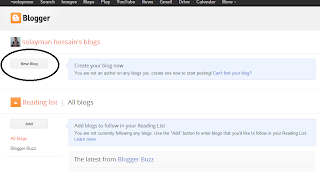
1st step: Go to www.blogger.com and sign in with your gmail/google account. If you do not have so sign up and create an account. After log into you will a see a page like this. Click on New Blog.


2nd step: After clicking on new blog chose a title like Online Bangladesh and take an address like OnlineBangladeshToday, which will be your web address as